

Balance Transfer
Make Your Balance Transfer to RGCU!
Did you know you can put your RGCU credit card to work for you? If you're carrying a balance on a credit card with another financial institution, transferring funds using your available RGCU credit may be easier than you think! Transfer balances up to the amount of your approved Visa credit limit.
It's Simple!
You can transfer available funds from your RGCU credit card to your checking account and use those funds to pay off your balance at another financial institution.
Why Consider an RGCU Balance Transfer?
-
Make the most of your available credit: Put your RGCU credit card to work for you.
-
Simplify your finances: Bring your credit card balances together.
-
Enjoy convenience: Manage your RGCU credit card in one place.
Don't let your available credit go unused! Explore your options and see how an RGCU balance transfer may help simplify your finances.
Select a tab at the top for more detailed instructions.
Online Banking Step-By-Step Instructions
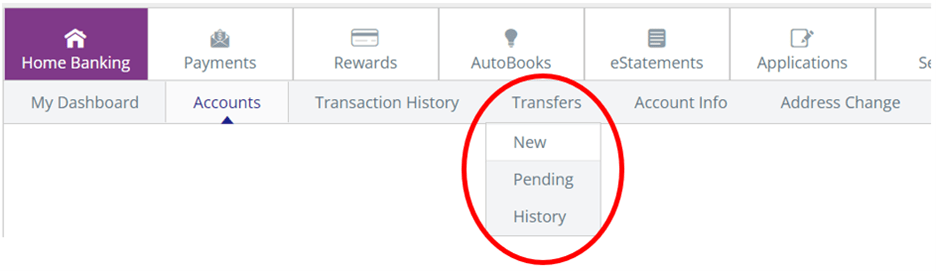
- Log into Online Banking and Select "Transfers" and select "New."
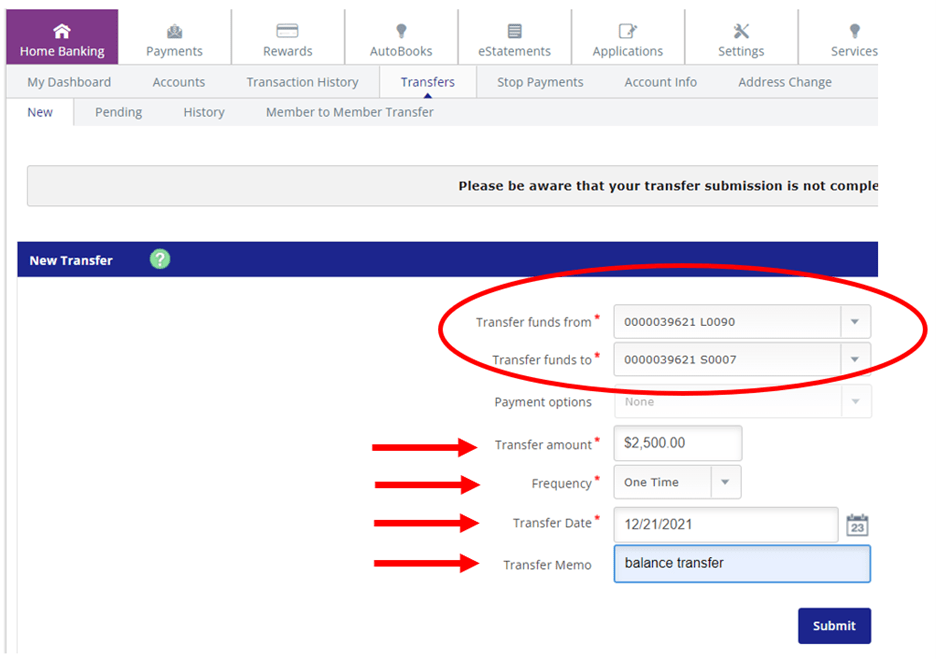
- Select Transfer Funds from your Visa Account
- Select Transfer Funds to your Checking or Savings account
- Enter the Transfer amount
- Select Frequency as "One Time."
- Enter "Balance Transfer" in the Transfer Memo section so you can track later if necessary.
- Press Submit
Mobile Banking Step-By-Step Instructions
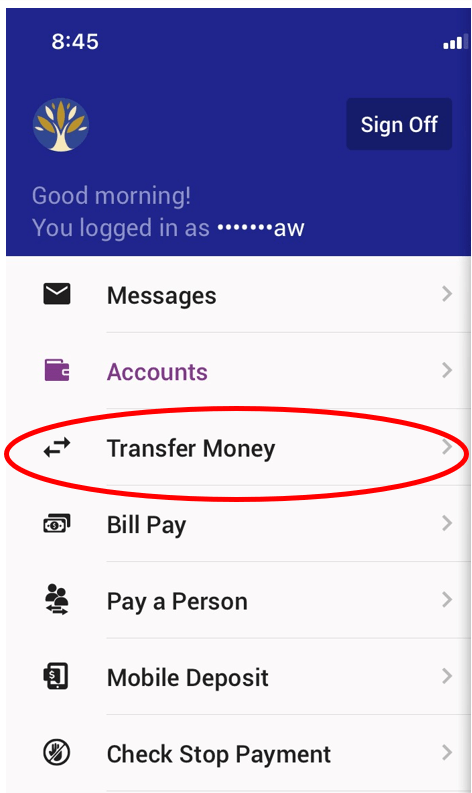
- Log into Mobile Banking and Select "Transfer Money"
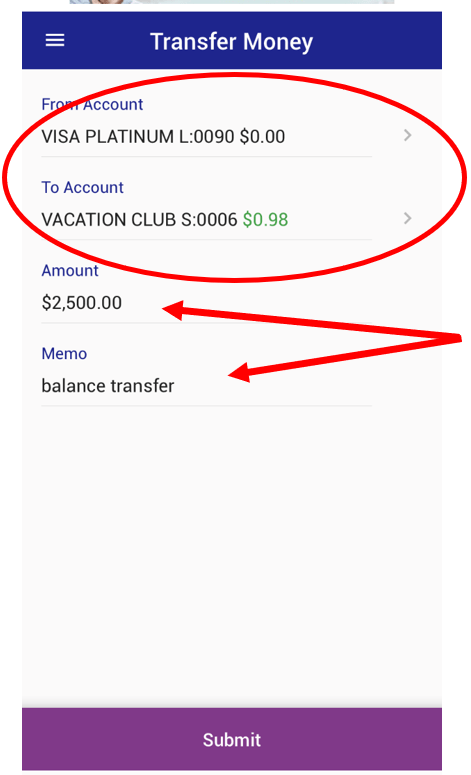
- Select Transfer Funds from your Visa Account
- Select Transfer Funds to your Checking or Savings account
- Enter the Transfer amount
- Enter "Balance Transfer" in the Transfer Memo section so you can track later if necessary.
- Press Submit
Don't Have an RGCU Visa Yet?
Online Banking Instructions
Step-by-step instructions
1. Log into Online Banking and Select "Transfers" and select "New."
2. Select Transfer Funds from your Visa Account
3. Select Transfer Funds to your Checking or Savings account
4. Enter the Transfer amount
5. Select Frequency as "One Time."
6. Enter "Balance Transfer" in the Transfer Memo section so you can track later if necessary.
7. Press Submit
Now simply pay off other loan balances using the new funds in your checking or savings account.
Mobile Banking Instructions
Step-by-step instructions
1. Log into Mobile Banking and Select "Transfer Money"
2. Select Transfer Funds from your Visa Account
3. Select Transfer Funds to your Checking or Savings account
4. Enter the Transfer amount
5. Enter "Balance Transfer" in the Transfer Memo section so you can track later if necessary.
6. Press Submit
Now simply pay off other loan balances using the new funds in your checking or savings account.